Subscribe Now For A Free Five Step Tutorial
Get a free five-part email course that shows you how to find, validate, and launch your side hustle idea — no experience required.
What It's About
How to work smarter (and work less) using automation and workflows.
Notes from Chris
Episode 1241
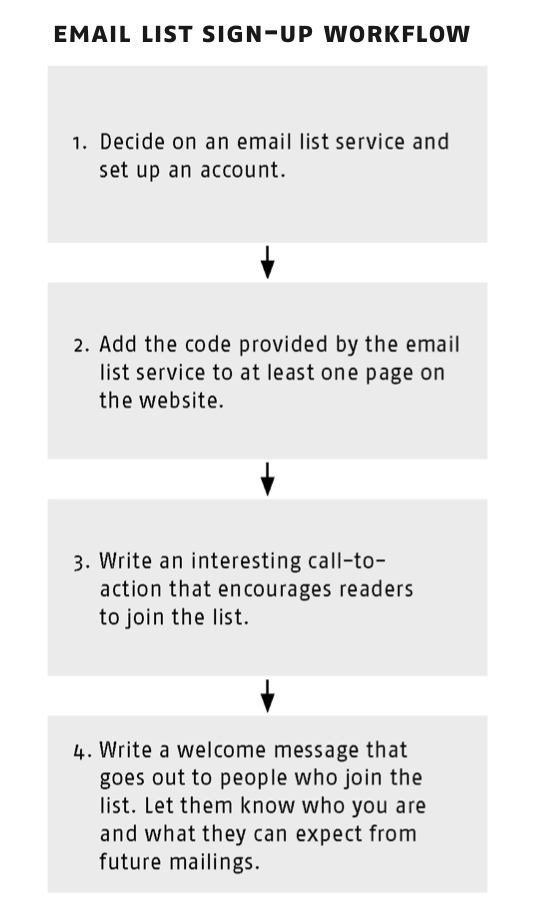
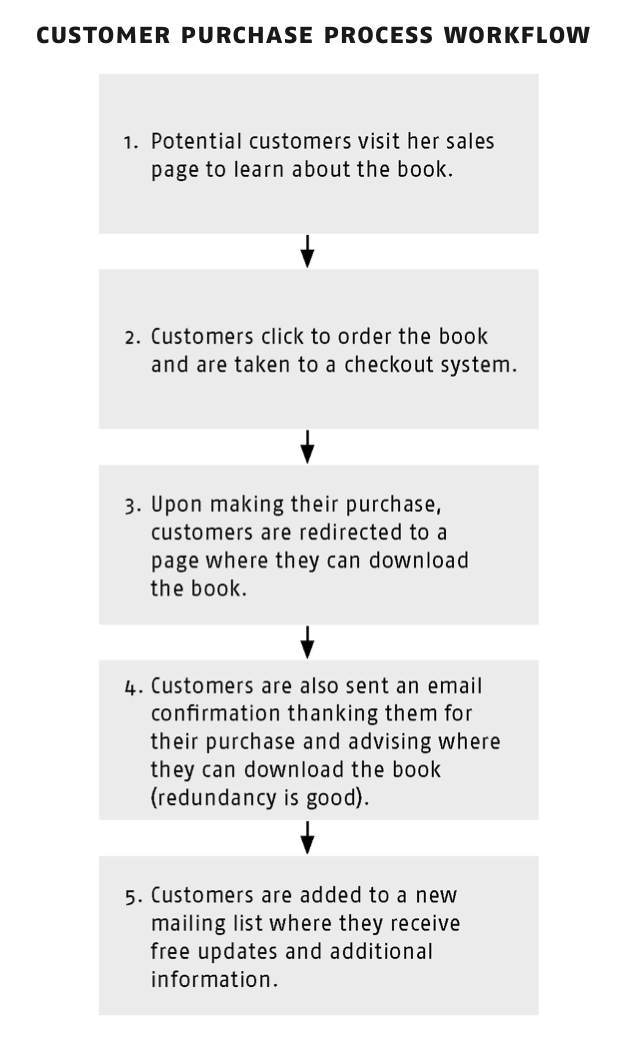
How can you make a manual process easier? It starts by answering the question: how can I do this better? For example, I’ve been using a tool called Keyboard Maestro. I take a lot of screenshots, and sometimes I need to copy and paste the screenshot into a Keynote presentation or other program. I used to have to take the screenshot, save it to Dropbox, and then open the file manually before copying over the image to Keynote or whatever. Finally I realized, this should be simpler. I used Keyboard Maestro to create a single button to do what was taking me at least six clicks before. Now I get really excited about taking screenshots! I’m going to give you a visual workflow of what a couple of different processes might look like. This is from the SIDE HUSTLE book, so if you have that book, they’re in Day 15. If you don’t have the book, not to worry, I’ve taken the images and added them on the show notes page for this episode. Listen to today's Classroom episode to learn more...MENTIONED IN THIS EPISODE: Workflows from Side Hustle: Email List Sign-up Workflow
 Customer Purchase Process Workflow
 THIS WEEK’S ASSIGNMENT:
Consider what you can do to simplify or otherwise make your order process more efficient. Experience the lifechanging magic of taking screenshots with one button!
THIS WEEK’S ASSIGNMENT:
Consider what you can do to simplify or otherwise make your order process more efficient. Experience the lifechanging magic of taking screenshots with one button!
Inspiration is good; inspiration combined with action is better. Now get back to work! Yours in the revolution,